Modern large language models (LLMs) can write code, analyze documents, hold conversations in dozens of languages, and pass hard exams. Yet they share one fundamental flaw: every new session starts from a blank slate. Claude, GPT, Gemini, and their peers don't remember what you told them yesterday unless a developer wires in a dedicated memory mechanism. This article is about turning Claude from a "disposable helper" into a system with long-term memory that keeps facts, preferences, and context across conversations.
We'll cover three memory layers: file-based instruction memory (CLAUDE.md), vector RAG, and a knowledge graph. The main focus is the Graphiti + FalkorDB + MCP stack: an open toolchain that turns conversations into a temporal knowledge graph and plugs into Claude via the Model Context Protocol. You'll get a step-by-step deployment guide, code examples, a comparison with the alternatives (mem0, Letta, Cognee, Zep, the standard MCP memory server), and an adoption checklist.
Contents
- The problem: why LLMs "forget"
- Types of memory for an AI assistant
- What a knowledge graph is, in plain terms
- Persistent memory for Claude in practice
- Graphiti + FalkorDB as the assistant's "brain"
- Step by step: Claude + Graphiti + FalkorDB
- A survey of existing solutions
- Common mistakes and pitfalls
- FAQ
- Conclusion
- Sources
The problem: why LLMs "forget"
The root of LLM "forgetfulness" lies in two constraints of the transformer architecture.
The first constraint is the context window. Every time you send Claude a message, the entire conversation history, system instructions, and attached files have to fit into a fixed "window" of tokens. Even the newest models have a hard limit: once a conversation outgrows it, older fragments get evicted or the session simply breaks. The model cannot "recall" anything that no longer fits into active context.
The second constraint is the lack of state between sessions. By default, LLMs have no long-term storage. When you close the terminal or restart Claude Desktop, the model keeps nothing: not your preferences, not the project architecture, not the outcomes of earlier discussions. The next conversation starts like the first one, and you're back to explaining the basics.
These constraints cause real problems in day-to-day work:
- Repeating context. Every session you re-explain the project's stack, the code style rules, the build commands.
- Losing lessons. If Claude figured out a quirky bug in your environment yesterday, today it has no memory of it.
- No personalization. The assistant never accumulates knowledge of your working style, priorities, and preferences.
- Errors from stale data. Even when facts are stored, the model can't always tell which one is current and which is historical.
This is exactly why the industry is busy building memory systems for LLMs. The goal: move long-term knowledge out of the context window into external storage, then fetch the right facts at the right moment.
Types of memory for an AI assistant
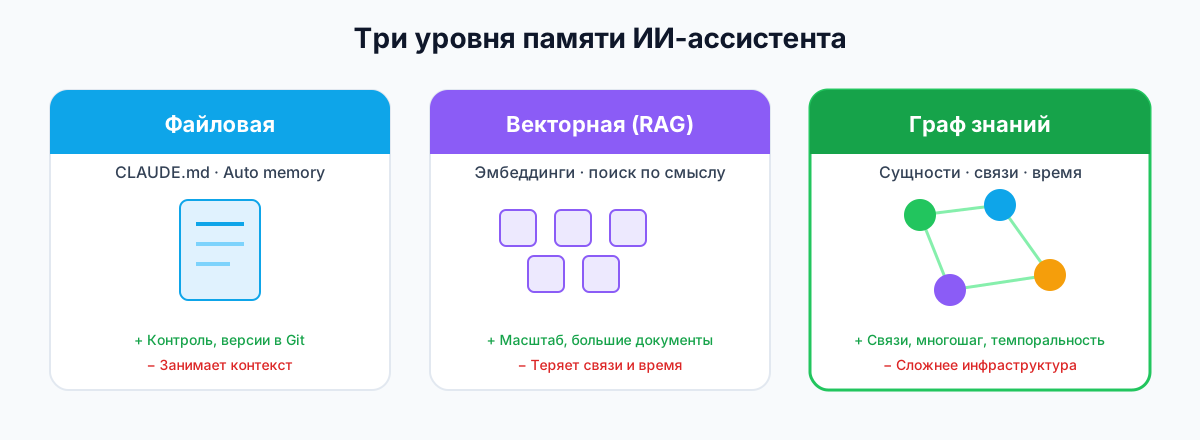
For Claude and similar assistants there are three broad classes of memory. Each solves its own problem, comes with its own trade-offs, and in practice they're often combined.
(a) File-based / instruction memory (CLAUDE.md)
This is the simplest, most reliable layer. You create a CLAUDE.md file in the project (or .claude/CLAUDE.md) and write down instructions, rules, and reference notes. Claude Code loads it automatically at the start of every session. Per Anthropic's official docs, memory lives at several levels: organization (/Library/Application Support/ClaudeCode/CLAUDE.md), user (~/.claude/CLAUDE.md), project (./CLAUDE.md), and local (./CLAUDE.local.md) [1].
Pros:
- Full control over the contents.
- No extra services required.
- Works offline.
- Versions cleanly in Git.
Cons:
- Eats space in the context window.
- Doesn't update itself from the conversation.
- Scales poorly: an overly long
CLAUDE.mddegrades instruction-following accuracy.
On top of that, Anthropic shipped Auto memory: Claude writes its own notes to ~/.claude/projects/<project>/memory/MEMORY.md based on your corrections and preferences. Only the first 200 lines or 25 KB of MEMORY.md get loaded; more detailed topic files are read on demand [1].
(b) Vector memory (RAG / embeddings)
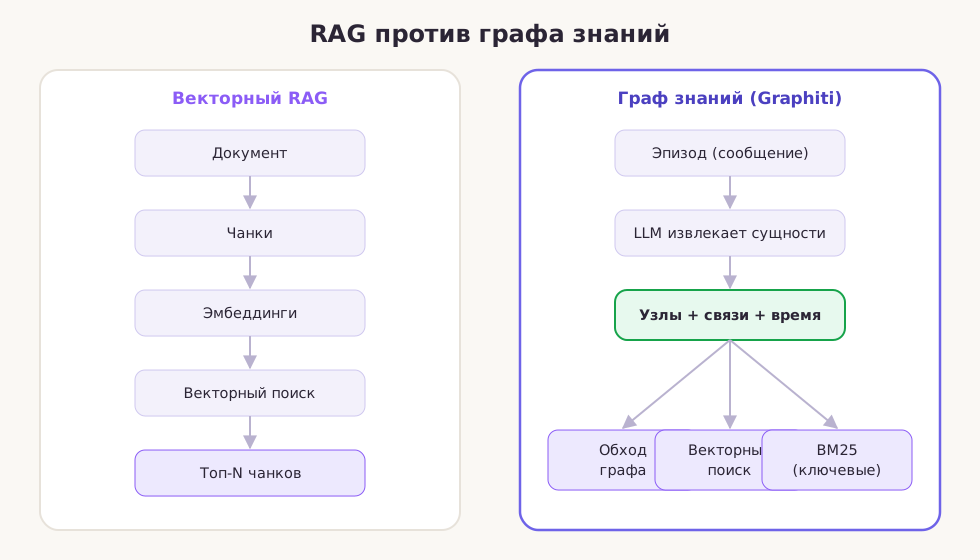
The vector approach stores text fragments (chunks) as embeddings — dense numeric vectors. When the user asks a question, the system finds the most semantically similar chunks and injects them into the prompt. This is standard Retrieval-Augmented Generation (RAG).
Pros:
- Scales well to large documents.
- Simple infrastructure: a vector DB is enough (Qdrant, Pinecone, pgvector, Chroma).
- Effective for search by meaning.
Cons:
- Loses structure: relations between entities stay implicit.
- Ignores time: stale and current facts can blend together.
- Struggles with multi-hop reasoning.
- Results depend on chunk size and quality.
(c) Knowledge graph
A knowledge graph stores information as entities (nodes) and relations (edges). For example: (Алиса) — [работает в] → (Яндекс). Modern systems like Graphiti add a temporal dimension: every fact carries a validity window — when it became true and when it stopped being current [2].
Pros:
- Explicit structure: entities and relations are cleanly separated.
- Supports multi-hop reasoning.
- Temporal queries become possible: "what was true 3 months ago?"
- Better interpretability: you can visualize and audit it.
Cons:
- More complex infrastructure.
- Requires entity extraction from text (usually via an LLM).
- Overhead of building and maintaining the graph.
When to use which
- CLAUDE.md — for stable rules, code style, architectural decisions, build commands.
- Vector RAG — for large documents, knowledge bases, FAQs, where semantic search matters.
- Knowledge graph — for dynamic, interconnected, personal data: user preferences, project history, evolving entities.
What a knowledge graph is, in plain terms
A knowledge graph stores information not as flat text or tables, but as a network of interconnected objects.
Core concepts
- Entity — an object from the real world or your domain: a person, company, product, project, technology.
- Relationship (edge) — a relation between two entities: "works at", "uses", "depends on", "prefers".
- Fact — a concrete statement expressible as an entity–relation–entity triple or as an entity property.
- Episode — the raw data a fact was extracted from: a user message, a document, an event log.
A simple fact looks like this (the examples below are in Russian — "Ivan works at Sber", etc.):
(Иван) — [работает в] → (Сбер)
(Иван) — [использует] → (Python)
(Сбер) — [находится в] → (Москва)
Why a graph beats flat text and vectors
| Criterion | Flat text | Vector RAG | Knowledge graph |
|---|---|---|---|
| Structure | None | Implicit | Explicit |
| Relations | Buried in text | Approximate, by similarity | Typed and navigable |
| Multi-hop reasoning | Weak | Limited | Strong |
| Temporal evolution | Hard to track | No | Supported (in Graphiti) |
| Interpretability | Low | Medium | High |
Temporality: facts go stale
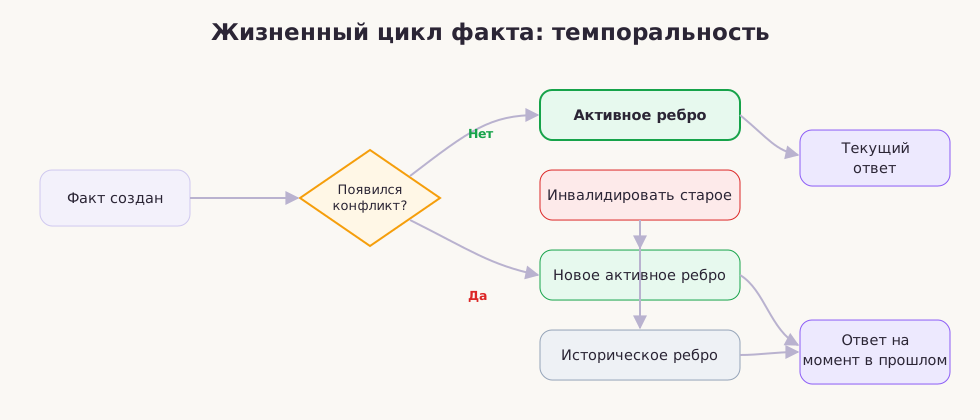
In the real world, facts change. A person switches jobs, a project moves to a different stack, a customer changes plans. A memory system that ignores time can return a contradictory or outdated answer.
Graphiti solves this with temporal labels on every edge: valid_at — when the fact became true, invalidated_at — when it stopped being current. An old fact isn't deleted; it's marked historical. That lets you query both the current state and the state at any point in the past [2].
For example (a customer's plan history — Free, Enterprise, Pro):
Март 2024: Клиент на тарифе Free
Июль 2024: Клиент перешёл на Enterprise
Сентябрь 2024: Клиент перешёл на Pro
The graph knows the customer is on Pro now, but asked "what was true in June?" it returns Free.
Persistent memory for Claude in practice
Anthropic's Claude Code ships with a built-in memory system that works on two levels: instructional and automatic.
CLAUDE.md: manual memory
The CLAUDE.md file is the primary way to hand Claude stable context. It loads automatically when a session starts. You can create it in the project root, your home directory, or at the organization level [1].
Rules for a good CLAUDE.md:
- Keep it short: aim for under 200 lines.
- Write concrete, verifiable instructions.
- Use headings and lists for structure.
- For large projects, split rules per directory via
.claude/rules/. - Use the
@path/to/file.mdsyntax to import additional files.
A minimal project-level CLAUDE.md (this example is in Russian, straight from our production setup):
# Проект MyAPI

## Стек
- Python 3.12, FastAPI, SQLAlchemy, PostgreSQL
- Тесты: pytest, запускать через `make test`
- Форматирование: ruff, проверка перед коммитом через `make lint`

## Архитектура
- Роутеры FastAPI находятся в `app/routers/`
- Модели базы данных — в `app/models/`
- Все миграции через Alembic в `migrations/`

## Правила
- Все эндпоинты должны возвращать Pydantic-схемы из `app/schemas/`
- Исключения ловить в роутерах, не в сервисах
Auto memory: notes Claude writes for itself
Auto memory ships in current versions of Claude Code and is on by default. Claude automatically saves notes to ~/.claude/projects/<project>/memory/ based on your corrections and recurring patterns [1]. The layout:
~/.claude/projects/<project>/memory/
├── MEMORY.md          # индекс, загружается в сессию
├── debugging.md       # заметки об отладке
├── api-conventions.md # соглашения по API
└── ...
Auto memory limitations:
- Only the first 200 lines or 25 KB of
MEMORY.mdget loaded. - Stored locally on the machine; doesn't sync across devices.
- No substitute for team conventions — those belong in
CLAUDE.md.
Projects memory in Claude
Claude Projects (on the web and in the app) let you attach documents to a project. It works like static RAG: you upload files, and Claude uses them when answering within that project. Great for knowledge bases, but it doesn't update dynamically from the conversation.
Extending memory via MCP
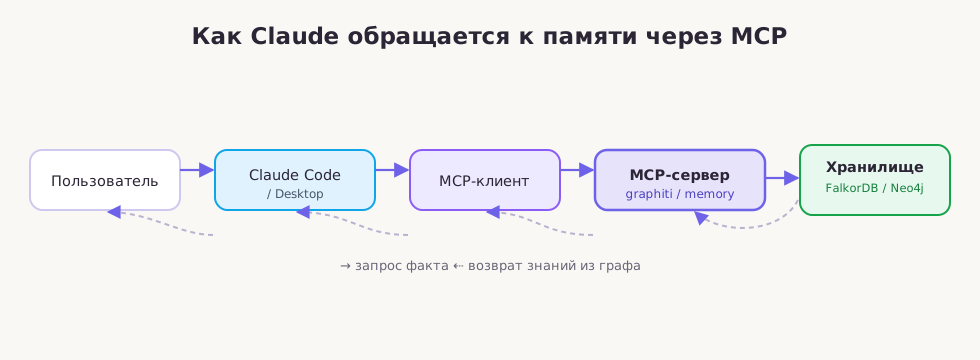
To go beyond built-in memory, Anthropic introduced the Model Context Protocol (MCP) — an open standard for connecting external tools and data sources to LLMs [3]. An MCP server acts as a middleman between Claude and external storage. Claude sees the available tools and can call them to write, read, or search facts.
MCP is exactly how you connect Claude to the Graphiti knowledge graph, the mem0 vector store, or the standard MCP memory server.
Graphiti + FalkorDB as the assistant's "brain"
What Graphiti is
Graphiti is an open-source framework from Zep for building temporal context graphs for AI agents. Unlike static knowledge graphs, Graphiti tracks how facts change over time, preserves each fact's provenance, and supports hybrid search [2].
Graphiti powers Zep's commercial platform but is released as a standalone open-source engine. Zep manages context graphs at scale; Graphiti lets you build and query individual graphs yourself [4].
Graphiti architecture
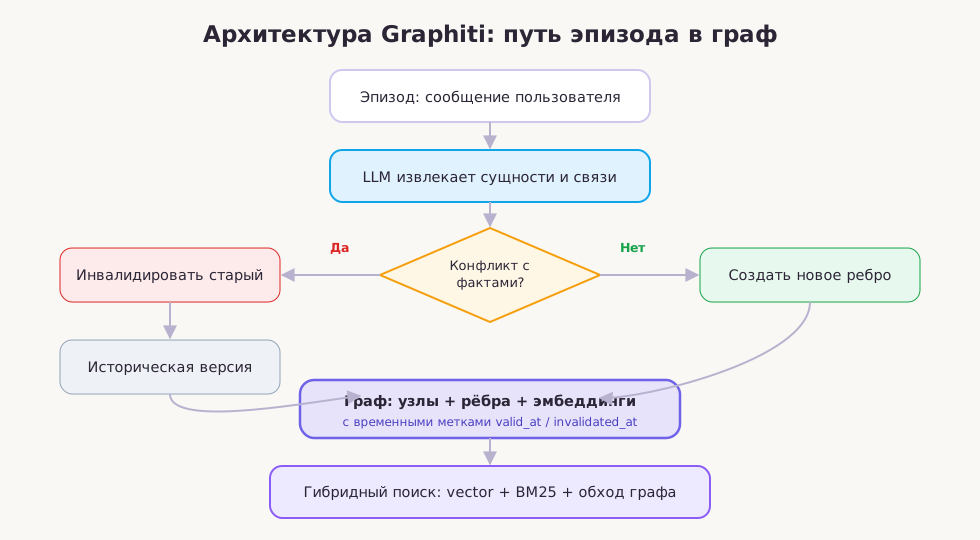
Graphiti is built from several layers:
- Data sources (episodes) — raw text: chat messages, documents, JSON events.
- LLM extraction — a model pulls entities and relations out of episodes.
- Graph storage — nodes (entities) and edges (facts/relations) with timestamps.
- Embeddings — vector representations for semantic search.
- Hybrid search — a combination of vector similarity, full-text search (BM25), and graph traversal.
The temporal model
Every fact in Graphiti is an edge with metadata:
valid_at— the moment the fact became true.invalidated_at— the moment it stopped being current (if applicable).created_at— when Graphiti learned of the fact.episode_id— a reference to the source episode.
When new information contradicts old, Graphiti doesn't delete the old edge — it marks it invalidated and creates a new one. That's what makes questions about both the present and the past answerable [2].
Why this beats plain RAG
| Aspect | Plain RAG | Graphiti |
|---|---|---|
| Handling changes | Requires reindexing | Incremental updates |
| Relations between facts | Implicit | Explicit, typed |
| Temporal queries | Not supported | Supported |
| Fact provenance | Lost | Preserved via episodes |
| Search | Semantic only | Vector + keyword + graph |
Graphiti posts strong numbers on agent-memory benchmarks: 94.7% accuracy on LoCoMo and 90.2% on LongMemEval, at roughly 150–160 ms latency [4].
FalkorDB as the store
FalkorDB is a high-performance graph database built as a Redis module. It uses GraphBLAS-based sparse adjacency matrices and supports the OpenCypher query language, full-text search, vector search, and the RESP/Bolt protocols [5].
Graphiti can run on top of Neo4j, FalkorDB, or Amazon Neptune. FalkorDB's MCP variant uses FalkorDB as the default backend, which keeps latency low and local deployment simple [6].
Step by step: Claude + Graphiti + FalkorDB
In this section we deploy the full stack: FalkorDB in Docker, the Graphiti MCP server, and hook it up to Claude Desktop or Claude Code.
Step 1. Spin up FalkorDB in Docker
The fastest way to run FalkorDB is the official image. Open a terminal and run (comments in the snippets are in Russian):
# Создаём директорию для данных
mkdir -p falkordb-data

# Запускаем FalkorDB
docker run -d --name falkordb \
  -p 6379:6379 \
  -p 3000:3000 \
  -v "$PWD/falkordb-data:/var/lib/falkordb/data" \
  --restart unless-stopped \
  falkordb/falkordb:latest
Once it's up, the web UI is available at http://localhost:3000. Port 6379 serves client connections over RESP/Bolt.
Check that the container is running:
docker ps --filter name=falkordb
Step 2. Install Graphiti (Python venv)
If you want to use Graphiti as a library or run the MCP server manually, create a virtual environment:
# Создаём окружение
python -m venv .venv

# Активируем (Linux/macOS)
source .venv/bin/activate

# Активируем (Windows)
# .venv\Scripts\activate

# Устанавливаем Graphiti с поддержкой FalkorDB
pip install graphiti-core[falkordb]
Make sure you have Python 3.10 or newer. LLM extraction will need an API key from OpenAI, Anthropic, or another supported provider.
Step 3. Start the Graphiti MCP server
The Graphiti repository ships a ready-made MCP server. The easiest route is the repo's Docker Compose, which brings up both FalkorDB and the MCP server [6]:
git clone https://github.com/getzep/graphiti
cd graphiti/mcp_server
docker-compose up
This command starts:
- FalkorDB on port 6379
- the FalkorDB web UI on port 3000
- the Graphiti MCP server on port 8000
If you'd rather run the MCP server by hand (say, for debugging), set the environment variables after installing graphiti-core[falkordb]:
export FALKORDB_HOST=localhost
export FALKORDB_PORT=6379
export OPENAI_API_KEY="sk-..."
export GROUP_ID="my_project"
and start the server from the mcp_server directory.
Step 4. Connect the Graphiti MCP server to Claude
Claude Desktop
For Claude Desktop, create or edit the claude_desktop_config.json config file [6]:
- macOS:
~/Library/Application Support/Claude/claude_desktop_config.json - Windows:
%APPDATA%\Claude\claude_desktop_config.json - Linux:
~/.config/Claude/claude_desktop_config.json
{
  "mcpServers": {
    "graphiti": {
      "command": "mcp-remote",
      "args": [
        "http://127.0.0.1:8000/mcp/"
      ]
    }
  }
}
Save the file and restart Claude Desktop. Claude can now reach the Graphiti tools.
Claude Code
In Claude Code, MCP servers are configured via the mcp.json file or the claude mcp add command. A sample config:
{
  "mcpServers": {
    "graphiti": {
      "command": "mcp-remote",
      "args": ["http://127.0.0.1:8000/mcp/"]
    }
  }
}
Or via the CLI:
claude mcp add-json graphiti '{
  "command": "mcp-remote",
  "args": ["http://127.0.0.1:8000/mcp/"]
}'
Step 5. The tools you get
The Graphiti MCP server exposes a set of memory tools [6]. A typical set includes:
add_episode— add an episode (message, document, fact) to the graph.search_nodes— find entities by query.search_facts— find facts/relations by query.get_node— fetch details on a specific entity.get_neighbors— fetch an entity's neighbors in the graph.
Exact names and signatures may shift between versions, so after connecting it's worth asking Claude: "Which Graphiti tools do you have access to?"
Step 6. Example: add a fact to the graph and find it
Once connected, you can ask Claude to remember things:
User: "Remember that our project uses FastAPI and PostgreSQL, and we deploy to Railway."
Claude calls add_episode with that text. Graphiti extracts the entities:
Project(our project)FastAPIPostgreSQLRailway
and the relations:
Project uses FastAPIProject uses PostgreSQLProject deploys_to Railway
Later, in a fresh session:
User: "What's our project's stack?"
Claude calls search_facts or search_nodes, gets the relations back, and answers:
"Your project uses FastAPI and PostgreSQL, with deployment set up on Railway."
Step 7. Wiring memory into the assistant's loop
To make memory work automatically, build a simple loop:
- Before generating a reply, Claude calls
search_factswith the user's query text. - The retrieved facts go into the system prompt as context.
- After replying, Claude calls
add_episodewith the new user message and its own answer. - Graphiti extracts new entities and relations, updating the graph.
In Claude Desktop and Claude Code, parts of this loop run automatically if the MCP server exposes the right tools. In your own applications you implement the loop by hand (comments in the snippet are in Russian):
import asyncio
from graphiti_core import Graphiti

async def chat_loop(graphiti: Graphiti, user_input: str, group_id: str):
    # 1. Поиск релевантных фактов
    facts = await graphiti.search_facts(user_input, group_id=group_id)
    context = "\n".join([f"- {fact.name}" for fact in facts])

    # 2. Генерация ответа (псевдокод)
    response = generate_llm_response(user_input, context)

    # 3. Сохранение эпизода
    await graphiti.add_episode(
        name="user_turn",
        episode_body=f"User: {user_input}\nAssistant: {response}",
        source="conversation",
        source_description="chat turn",
        group_id=group_id,
    )

    return response
Step 8. Shared memory across multiple AI clients
One of the key wins of MCP + Graphiti + FalkorDB is connecting several clients to the same store. For example:
- Claude Desktop on your workstation
- Claude Code in the terminal
- Your own Python script
- Other MCP-compatible clients (Cursor, Cline, and others)
Graphiti isolates data via group_id: each project, user, or workspace gets its own graph. That keeps data from leaking between different clients and teams [6].
A sample setup for two projects:
# Проект A
export GROUP_ID="project_alpha"

# Проект B
export GROUP_ID="project_beta"
If both projects point at the same FalkorDB, their graphs stay isolated at the group_id level.
A survey of existing solutions
The market for LLM memory systems is growing fast. Here are the key options we dug into while researching this article.
Anthropic Claude Code memory
The official Claude Code docs describe two mechanisms: CLAUDE.md (manual instructions) and Auto memory (automatic notes). CLAUDE.md files load at the start of every session, support @path imports, a hierarchy of levels (managed, user, project, local), and per-path rules [1]. Auto memory saves lessons to a local directory but is capped at 200 lines / 25 KB of index and doesn't sync across devices.
Good for: stable rules and local personalization. Limits: no structured long-term memory outside the context window, no answer to the temporal evolution of facts.
Graphiti and Zep
Graphiti is an open-source temporal context graph engine created by Zep. It turns episodes into entities and relations with timestamps, supports hybrid search, and runs on Neo4j, FalkorDB, and Amazon Neptune [2]. Zep is the managed platform on top of Graphiti, with an SDK, dashboard, and SLA [4].
Good for: explicit structure, temporality, strong benchmark accuracy. Limits: needs a graph database, an LLM for extraction, and infrastructure setup.
Anthropic's MCP memory server
The standard MCP memory server keeps knowledge in a local knowledge graph (entities, observations, relations) in a JSONL file or SQLite. It connects to Claude Desktop via npx @modelcontextprotocol/server-memory [7].
Good for: easy install, no separate database, fully local. Limits: no built-in temporality, limited scalability, primitive deduplication.
mem0
mem0 is a popular memory layer for personalized AI. It's available as an open-source library, a self-hosted server, and a cloud platform. It extracts facts from conversations, stores vector embeddings, supports graph memory on top of Neo4j, and isolates users [8].
Good for: simple API, broad integrations (LangChain, CrewAI, Vercel AI SDK), hybrid search. Limits: vectors are the main focus; graph memory takes extra setup; the cloud is paid.
Letta (formerly MemGPT)
Letta is a framework for stateful agents built on the "LLM as an operating system" idea. It uses hierarchical memory: core memory (always in context), archival memory (searched on demand), conversational memory, and external files. The agent can edit its own memory blocks through tools [9].
Good for: deep memory-management architecture, self-editing, long-lived agents. Limits: steeper learning curve; less geared toward simple Claude integration.
Cognee
Cognee is an open AI memory platform that turns unstructured data into a knowledge graph. The API boils down to four operations: remember, recall, forget, improve. It supports many backends (Neo4j, Kuzu, NetworkX, Postgres, Qdrant, LanceDB) and has a Claude Code plugin [10].
Good for: backend flexibility, memory improvement via feedback, multimodality. Limits: a young project, the API is still settling, requires understanding the pipeline.
FalkorDB and Neo4j
FalkorDB is a high-performance Redis-based graph database optimized for GraphRAG and agent memory [5]. Neo4j is the leader among graph databases, with a broad ecosystem of LLM integrations including the LLM Knowledge Graph Builder and Google's Gen AI Toolbox [11].
Good for: mature graph storage, solid performance, large communities. Limits: FalkorDB is SSPL-licensed; Neo4j requires licensing for some enterprise features.
Comparison table
| Solution | Memory type | Temporality | Graph / vector | Self-host / license | Complexity |
|---|---|---|---|---|---|
| Graphiti/Zep | Graph + embeddings | Yes | Hybrid | Self-hosted (Graphiti) / cloud (Zep), Apache 2.0 | Medium |
| mem0 | Vector + opt. graph | Partial | Hybrid | Self-hosted / cloud, Apache 2.0 | Low |
| Letta (MemGPT) | Memory blocks + archive | No | Vector/graph | Self-hosted / cloud, Apache 2.0 | High |
| Cognee | Graph + vector | Partial | Hybrid | Self-hosted / cloud, Apache 2.0 | Medium |
| MCP memory server | Local graph | No | Graph (JSONL/SQLite) | Self-hosted, MIT | Very low |
| Plain RAG | Vector | No | Vector | Self-hosted, depends on the DB | Low |
Which one to pick depends on the job:
- Quick local memory with zero infrastructure — MCP memory server.
- Chatbot personalization with a simple API — mem0.
- Long-lived agents with self-editing — Letta.
- A flexible knowledge graph with temporality — Graphiti/Zep.
- Universal AI memory with many backends — Cognee.
Common mistakes and pitfalls
Even with the right tools, wiring memory into an LLM carries risks. These are the most frequent ones.
Token costs of extraction
Graphiti, mem0, and their peers use an LLM to extract entities and relations from text. Every episode burns tokens. If you save every single chat message, LLM call costs can grow substantially. The fix: filter episodes, save only the meaningful ones, use cheap models for extraction.
Duplicate entities
The same object can go by different names: "Яндекс", "Yandex", "Yandex LLC". Without name normalization the graph fills with duplicates, which degrades search and reasoning. Graphiti and some MCP memory server forks handle this via entity name normalization, but in practice you still need quality control.
Data privacy
Memory stores personal data, corporate information, and intellectual property. With cloud versions (Zep Cloud, Mem0 Cloud, Letta Cloud) that data leaves your infrastructure. For sensitive scenarios, pick self-hosted options and encrypt the storage.
The cost of LLM calls
Persistent memory is not a one-time setup. Every episode added, every fact search, every graph update may require LLM calls. Under heavy load this becomes a real line item. Budget for it and use caching.
Broken tenant isolation
When several users or projects share one graph, group_id (or an equivalent isolation mechanism) has to be configured correctly. Otherwise one user's memory can "leak" into another's. Graphiti handles this via group_id [6]; mem0, via user_id and agent_id.
Overestimating what memory does
Memory doesn't make the model smarter. It only provides access to facts. If the underlying data is inaccurate or contradictory, the model will produce inaccurate answers. Audit the stored facts regularly.
Conflicts with CLAUDE.md
If CLAUDE.md and the knowledge graph give contradictory guidance, Claude can behave unpredictably. Split the responsibilities: CLAUDE.md for stable rules, the graph for dynamic facts.
FAQ
1. Do I have to use FalkorDB with Graphiti?
No. Graphiti supports Neo4j, FalkorDB, and Amazon Neptune. FalkorDB is convenient for local deployment thanks to its simple Docker image and low latency, but in production you're free to pick another backend [2].
2. Can I use Graphiti without Claude?
Yes. Graphiti is a Python library with an open API. You can use it in your own applications and agents, or via the REST/MCP server. Hooking it up to Claude is just one of the scenarios [2].
3. What's better to start with: the MCP memory server or Graphiti?
If you need simple local memory with no extra infrastructure, start with the MCP memory server. If structure, relations, temporality, and scale matter to you, go with Graphiti [7].
4. How do I protect the data in a knowledge graph?
Use a self-hosted deployment, encrypt the disk storage, set up isolation via group_id/user_id, restrict network access to FalkorDB, and take regular backups.
5. Does Graphiti cost money?
Graphiti itself is Apache 2.0 and free. You only pay for infrastructure (server, database) and for LLM/embedding API calls. Zep offers a paid managed cloud on top of Graphiti [4].
6. Can CLAUDE.md, Auto memory, and Graphiti be combined?
Yes — and that's the recommended setup. CLAUDE.md sets the stable rules, Auto memory gathers local lessons, and Graphiti keeps structured facts and relations across sessions.
7. Which LLMs work for entity extraction?
Graphiti officially supports OpenAI, Anthropic, Azure OpenAI, Google Gemini, and Groq (the latter offers a free API key — handy for experiments). For entity extraction, compact models like GPT-4o mini or Claude Haiku are usually enough and keep costs down [2].
8. What happens if I delete the FalkorDB container?
If you ran the container without a volume (-v), the data is gone. The instructions above use -v "$PWD/falkordb-data:/var/lib/falkordb/data", so the data survives on the host disk even after the container is removed.
Conclusion
Persistent memory turns an LLM from a disposable helper into a long-term partner. Claude has several memory layers to work with: file-based (CLAUDE.md), automatic (Auto memory), and external (via MCP). A knowledge graph is the most powerful of the external approaches — especially when the data is interconnected, dynamic, and time-sensitive.
The Graphiti + FalkorDB + MCP stack gives you an open, locally deployable solution for agent memory. It turns conversations into a structured temporal graph, supports hybrid search, and plugs straight into Claude Desktop and Claude Code. Alternatives like mem0, Letta, and Cognee tackle similar problems with different trade-offs in complexity, features, and cost.
Adoption checklist
- Decide which data needs to survive between sessions.
- Set up a project-level
CLAUDE.mdwith stable rules. - Enable Auto memory in Claude Code (if you use the CLI).
- Pick an external memory system: MCP memory server, mem0, Letta, Cognee, or Graphiti.
- For Graphiti: deploy FalkorDB in Docker, start the Graphiti MCP server.
- Connect the MCP server to Claude Desktop / Claude Code.
- Verify isolation via
group_id(for multiple projects/users). - Configure the LLM provider for entity extraction.
- Test writing and searching facts.
- Set up storage backups.
- Estimate LLM call costs and tune write frequency.
- Audit stored facts for duplicates and stale data.
Sources
- Anthropic. Claude Code: Memory. code.claude.com/docs/en/memory
- getzep/graphiti. GitHub repository. github.com/getzep/graphiti
- Model Context Protocol. Official website. modelcontextprotocol.io
- Zep. Graphiti: The Context Graph framework. getzep.com/platform/graphiti
- FalkorDB. Official documentation. docs.falkordb.com
- FalkorDB blog. Knowledge Graph MCP: Graphiti + FalkorDB memory. falkordb.com
- modelcontextprotocol/servers. Knowledge Graph Memory Server. github.com
- mem0ai/mem0. GitHub repository. github.com/mem0ai/mem0
- letta-ai/letta. GitHub repository. github.com/letta-ai/letta
- topoteretes/cognee. GitHub repository. github.com/topoteretes/cognee
- Neo4j blog. Build AI agents with knowledge graphs. neo4j.com
- Graphiti documentation. Welcome to Graphiti. help.getzep.com/graphiti/getting-started/welcome
- mem0 documentation. docs.mem0.ai
- Letta documentation. docs.letta.com
- Datastudios. Claude Code Memory, CLAUDE.md, Persistent Instructions. datastudios.org
Keep reading
All articlesAbout this article
This article is part of skillmake.ru — a Russian-language project about building real products with AI agents. The article you're reading is a translated case study from our production experience.