You already know that AI can write code, draw pictures, and answer questions in a chat. But once you're building your own thing — a game, a service, a simple script — the question comes up: how do you wire that magic right into the product so it runs automatically, without you? The answer is simple: through an API. Below we break down the Groq API — a service that gives you access to fast open-weight models nearly free at the start. First, the key itself in five steps and the free-tier limits we measured on our own account. Then, what Groq actually is, how it differs from the similarly named Grok, and how to write your first working task in JavaScript.
The short version: where to get the key
- Go to console.groq.com and sign in — via Google, GitHub, or email. No credit card needed. If the site won't open or returns a 403 — that's Groq blocking Russian IPs (we write from Russia, so we hit this constantly); turn on a VPN (why this happens).
- Open the API Keys section in the console's left menu.
- Click Create API Key, give the key a name, and hit Submit.
- Copy the
gsk_…string immediately — the full key is shown only once.
Drop the key into a .env file as GROQ_API_KEY=gsk_… — and from there the shortest path is: tell your AI assistant "the Groq key is in .env as GROQ_API_KEY, wire up the Groq API and verify a request goes through." It will write and run the check itself. If you want to understand what's happening under the hood, the step-by-step explanations are right below, and the measured free-tier limits are in their own section.
This article is part of skillmake.ru — a Russian-language project about building real products with AI agents. The article you're reading is a translated case study from our production experience.
Contents
- How to get a free API key, step by step
- What console.groq.com is and what's inside
- The real free-tier limits
- Groq is down or won't open: what to check
- What Groq is, and why it's NOT the same as Grok
- Why a beginner developer needs the API, not just a chat in the browser
- Why Groq is known specifically for speed
- A simple task you can solve with the Groq API in your own project
- How to write prompts so the answers are predictable
- How to integrate the Groq API into a web app
- Typical beginner mistakes and how to avoid them
- FAQ
- Conclusion
- Sources
How to get a free API key, step by step
Now the same steps in more detail — with one security nuance beginners tend to ignore.
Step 1. Sign up at console.groq.com
Groq's developer console lives at console.groq.com — don't confuse it with the main groq.com, which is all marketing (what's inside the console, covered separately). You can sign in via Google, GitHub, or email. There's no card verification: the free tier switches on right after signup. If the service offers two-factor authentication — enable it. From a Russian IP the console won't open at all: the server returns 403 before you even see the login window, so turn the VPN on beforehand (what this block is).
Step 2. Find the API Keys section
After signing in, the console's left menu has an API Keys item — direct link: console.groq.com/keys. This page is home to all your keys: you create them here and revoke them here.
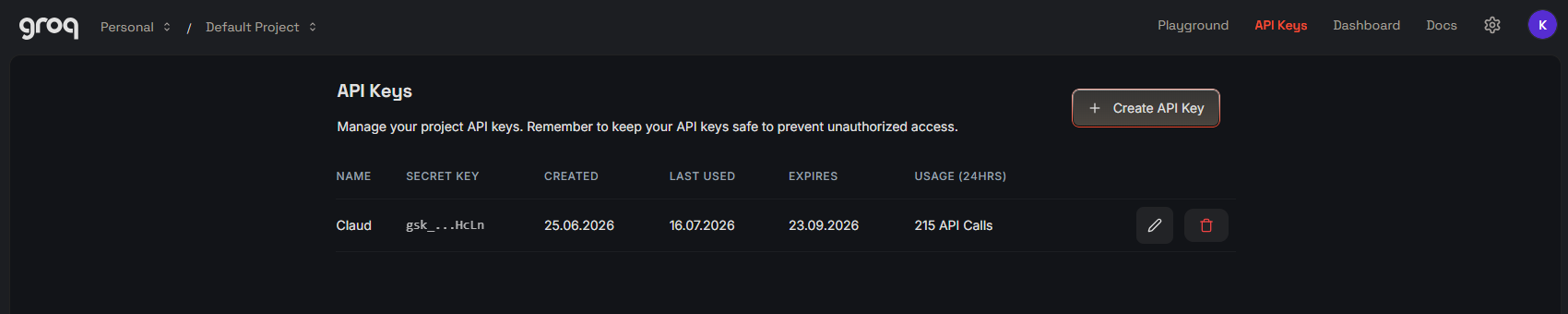
Step 3. Create and copy the key
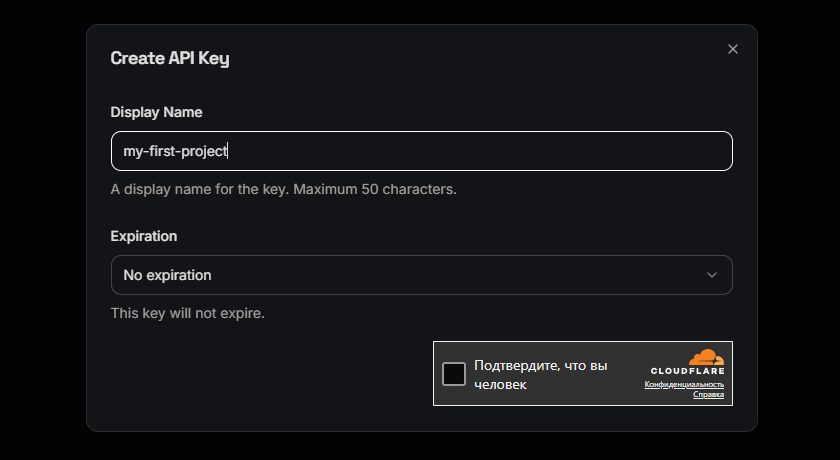
Click Create API Key. The console will ask for a key name — name it after the project, say my-first-project, so you can later tell which key is used where. It will also ask you to confirm you're human.
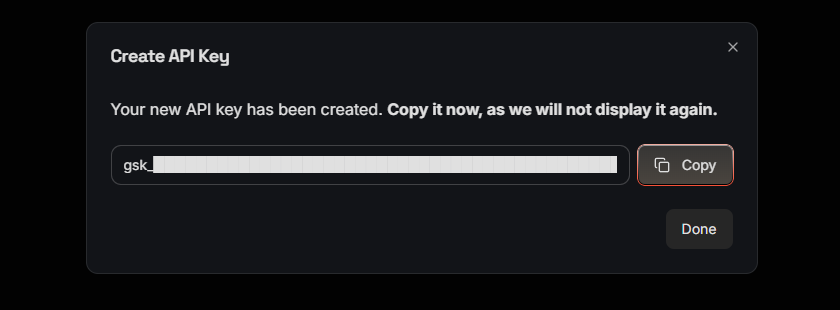
After you hit Submit, the key itself appears: a long string starting with gsk_. Copy it right away — the full key is shown only once; after the dialog closes, only the first characters remain visible. Lost it anyway? No big deal: delete the old key and create a new one — it's free and takes seconds.
Step 4. Store the key in .env, never in code
Here's the most important rule. Never paste an API key directly into code. Not into a JavaScript file, not into HTML, not into a GitHub repo. If the key ends up public, anyone can use it on your dime, and your account can get blocked.
The right way is to keep the key in environment variables, usually in a .env file. For more on why this matters and how to store tokens properly, read "Storing secrets and tokens".
An example .env file:
GROQ_API_KEY=gsk_xxxxxxxxxxxxxxxxxxxxxxxxxxxxxxxxxxxx
And in code you read the key like this:
const apiKey = process.env.GROQ_API_KEY;
If you're working on a frontend, remember: browser code is visible to every user. So make Groq API requests from a server, not straight from the browser. For a learning project this may feel like overkill, but doing it right from day one will save you a lot of pain.
Step 5. Verify the key works
The easiest check is a test request. You can do it from the terminal with curl or write a small script. If generated text comes back — everything is set up correctly.
curl -X POST https://api.groq.com/openai/v1/chat/completions \
  -H "Authorization: Bearer $GROQ_API_KEY" \
  -H "Content-Type: application/json" \
  -d '{
    "model": "llama-3.1-8b-instant",
    "messages": [{"role": "user", "content": "Привет, расскажи, чем ты полезен разработчику"}]
  }'
If you see JSON with the model's reply — congratulations, your Groq API key works.
flowchart TB
    A["Регистрация на console.groq.com"] --> B["Раздел API Keys"]
    B --> C["Create API Key + имя"]
    C --> D["Скопировать ключ gsk_…"]
    D --> E["Сохранить в .env"]
    E --> F["Тестовый запрос curl"]
    F --> G["Ключ работает"]
What console.groq.com is and what's inside
console.groq.com is Groq's developer console: the account area where your keys, sandbox, and usage stats live. The main groq.com is the company's storefront; you can log in from there too, but the console is where you'll actually work. We use it daily, and in practice five sections matter:
- API Keys (console.groq.com/keys) — creating and revoking keys. The steps above lead here.
- Playground (console.groq.com/playground) — the sandbox: pick a model, type a prompt, and see the reply right in the browser, no code. Handy for trying a model on for size before writing an integration.
- Metrics (Dashboard → Metrics) — usage charts: how many requests and tokens went out, by day and by model. This is where you watch the daily limit melt.
- Billing (Settings → Billing: Plans and Limits) — your current plan and the limits table for your tier. Cross-check our measurements from the section below against this page.
- Docs (console.groq.com/docs) — the documentation and the current model list.
There's no separate signup form: sign-in and signup are the same window (Google, GitHub, or email), and the account is created on first login. And if the console won't open at all, it's most likely not you — see "Groq is down or won't open".
The real free-tier limits
Groq's free tier is a great entry point. But free doesn't mean unlimited. Every API has restrictions that protect the service from abuse and share the resources among users.
Restrictions usually come in two flavors:
- Requests per minute. You can't hammer the API too often. Exceed the limit, and subsequent requests will fail for a while.
- Tokens per day. Tokens are roughly word fragments the model splits text into. A daily token limit caps the total volume of text you can process.
Most articles on this topic wave you off with "check the docs." We took a different route and measured the limits on our own free key — via the x-ratelimit-* headers Groq returns with every response (measured July 2026, tier on_demand):
| Model | Requests per day | Tokens per minute | Tokens per day |
|---|---|---|---|
| llama-3.1-8b-instant | 14,400 | 6,000 | — |
| llama-3.3-70b-versatile | 1,000 | 12,000 | 100,000 |
| openai/gpt-oss-20b | 1,000 | 8,000 | — |
Note the first row: llama-3.1-8b-instant is the very model used in this article's examples. Its daily request quota is 14x more generous than the 70b version's, so for learning tasks and first integrations we recommend starting there.
What the table doesn't show are three rakes we stepped on ourselves:
- The minute limit trips before the daily one. A burst of back-to-back requests blows past 12,000 tokens per minute and catches a 429, even with the daily budget barely touched. The cure is pauses between requests.
- The daily token limit is the real ceiling. 100,000 tokens a day is roughly 10–15 long-text generations. And unlike the minute limit, the daily one doesn't reset until the UTC day rolls over: retries won't help, only waiting.
- The 429 error body states the exact cause —
on tokens per minuteoron tokens per day, plus aretry-afterfield. Read the response body, not just the status code: the cause decides whether you wait a minute or until tomorrow.
The numbers change over time and vary by model. You can check your own key's limits with one cheap request using "max_tokens": 1 — the current values come back in the x-ratelimit-* headers.
For a learning project or an MVP these limits are usually plenty. You won't be firing thousands of requests a minute while you learn. But if your app grows and starts serving real users, you'll have to watch your spend:
- Count requests. If you run a chatbot, every user message is an API request. A hundred requests a minute is a perfectly realistic number for a popular service.
- Count tokens. Long texts cost more than short ones. Sending a ten-thousand-character article into the API burns far more tokens than a single question.
- Cache responses. If different users ask the same questions, there's no reason to hit the API every time. Save the answer and serve it from cache.
- Optimize prompts. The shorter and sharper the prompt, the fewer input tokens it takes. That saves limits and money.
When the free tier stops being enough, there's a paid level: minute and daily limits are orders of magnitude higher there, and the exact numbers for your tier are on the Billing → Plans page in the console. For starting out and experimenting, the free tier is fine; if your app critically depends on the API, budget for it and move to a paid plan before launch.
If you've hit the daily ceiling and aren't ready to pay, there are two workarounds: the free Kimi K3 chat for one-off tasks, and local models with no daily limits at all.
Groq is down or won't open: what to check
Come here if the console won't load or the API answers with an error. We ran the checks from our own account and from independent servers; the picture for each case is below.
Error 403: the site is closed to Russian IPs
Groq blocks Russia on its side. We verified via check-host.net from three Moscow nodes: both console.groq.com and api.groq.com answer "403 Forbidden." The same addresses from servers in Germany and the Netherlands return 401 Unauthorized — the normal reply to a request without a key. So the block is regional, at the Cloudflare level, and your connection has nothing to do with it.
The practical takeaway: from Russia, nothing works without a VPN — not signup, not the console, not the API itself. And the VPN isn't just for your browser: if your app's backend sits on Russian hosting, its requests to api.groq.com get a 403 too. The working setup is a VPN on the dev machine plus a non-Russian server (or proxy) for production. How a VPN works and where to start — in "What is a VPN".
Error 429: you hit a limit
Requests were going through and then stopped — that's almost certainly a rate limit. Read the response body, not just the code: it says whether you hit the minute ceiling (wait a minute) or the daily one (wait for the next UTC day). The numbers and the three rakes we stepped on ourselves are in the limits section above.
Error 400: the model was decommissioned
Code from an old tutorial returns model not found or decommissioned — the model from the example has been retired by Groq. Swap the model name for a current one from the model list; the rest of the code stays as is. More in "Typical mistakes" below.
The console opened, then everything died mid-session
A special case of the same regional block: if the VPN drops during a session, the console and the API start returning 403 right in the middle of your work. Check the VPN first — before blaming the key or the code.
What Groq is, and why it's NOT the same as Grok
Let's start with the big mix-up. There are two similar words: Groq and Grok. They sound almost identical but are completely different products from different companies. Confuse them, and you'll spend a long time hunting the wrong site and the wrong instructions.
Groq is an American company that built specialized chips called LPUs — Language Processing Units. Regular neural networks run on NVIDIA GPUs. Groq went another way: it built hardware designed purely for running existing open-weight language models. These chips run Llama, Qwen, OpenAI's open gpt-oss models, and others. The lineup shifts: Mixtral, the model 2024 tutorials keep recommending, has already been decommissioned — we checked the model list via the API in July 2026, and it's gone. So Groq doesn't make its own model the way OpenAI or Anthropic do. It takes open weights and runs them on its ultra-fast hardware.
Grok is the chat AI from xAI, the company founded by Elon Musk. Entirely different product. Grok is built into the X ecosystem, with its own personality, its own subscription, and its own rules. It competes with ChatGPT and Claude, not with Groq. The names are similar because both riff on "grok" from Robert Heinlein's science fiction, meaning to understand something deeply.
So:
| Parameter | Groq | Grok |
|---|---|---|
| What it is | A platform for running open models fast via an API | A chatbot from xAI |
| Who makes it | Groq, the company | Elon Musk's xAI |
| Own model | No, serves open models | Yes, its own Grok model |
| How you use it | Via an API in your code | Via chat in the browser or the X app |
| Headline feature | Very low response latency | Access to X data and a distinctive style |
For a beginner vibe-coder the thing to remember is: if you're looking to embed fast AI into your own app — you want Groq and its API. If you want to chat with yet another chatbot — that's Grok.
One more point: Groq has been around for several years and positions itself as an infrastructure player. Their core bet is speed. They don't sell you a pretty interface for conversations; they sell you access to a model's brain with minimal latency. That fundamentally changes the experience: instead of waiting for the model to finish typing, you get the result almost instantly. Which is exactly why the Groq API is so interesting to developers building real-time products.
Why a beginner developer needs the API, not just a chat in the browser
Chat in the browser is convenient. You open a tab, type a prompt, get an answer. But chat only works while you personally sit at the computer asking questions. The app you're building can't open a browser and ask you to go query an AI. It needs a direct line to the model that works automatically. That line is called an API.
An API — Application Programming Interface — is how one program talks to another. With the Groq API, your code sends a text request to Groq's server, the server runs the model and returns a text response. All of it happens inside your app with no human involved. For more on what an API is in general, see "What is an API".
Here are some real tasks you can only solve through the API, not through chat:
- Automatic support replies. A user asks a delivery question in your support chat. Your app sends the question to the Groq API, gets a polite reply, and shows it to the user right away.
- Product description generation. You run an online store. When a new product is uploaded, the app asks the Groq API to write a selling description from the specs.
- Summarizing long texts. A user uploads a big document. The app splits it into chunks, sends them to the API, and returns a summary.
- Code review and fixes. You're vibe-coding, and sometimes the AI assistant produces buggy code. Your app can send that code to the Groq API and ask it to find the bugs.
- A chatbot inside your service. A user asks a question right in your app, and the model generates the answer on the fly.
For a beginner in vibe coding this matters a lot. Say you're building a Snake game and want to add a smart helper that explains the rules to newcomers or generates hints mid-game. You can't do that through browser chat: the helper has to live inside the game, react to the player's actions, and answer instantly. That's exactly what the API is for.
The API also gives you predictability. In chat, the answer can vary depending on how you phrased the question. In code, you can pin down the temperature, the system prompt, length limits, and the output format. That turns AI from a toy into a dependable product component.
One more plus: through the API you can handle many requests at once. Say a hundred users ask for a generation at the same time. Browser chat handles one conversation. The API lets your server fire parallel requests and return answers to everyone.
| Stage | Chat in the browser | API in the app |
|---|---|---|
| Input | The user asks a question | The user takes an action |
| Processing | The chat model | Your app → the Groq API |
| Output | The user gets an answer | The user sees the result |
Why Groq is known specifically for speed
Plenty of services offer access to language models via an API. Groq stands out on one metric: speed. Not model count, not the smartest chat — just how fast the model returns an answer.
Regular language models run on general-purpose GPUs. GPUs are good at many things: games, rendering, neural networks. But they're not purpose-built for language models. Groq designed specialized LPU chips that do one job — push text through a neural network — and do it very fast.
As a result, the time between sending a request and the start of the reply — the latency — is tiny with Groq. For the user it means no staring at a blinking cursor: the result appears almost as soon as the button is pressed.
Why does this matter for your app? A few examples:
- Real-time interfaces. If there's a chatbot inside your app, users expect a reply within a fraction of a second. A long delay is irritating and makes the app feel frozen.
- Autocomplete and suggestions. When a user is typing and the app offers a continuation, every millisecond counts. A slow API turns a helpful feature into an annoying one.
- Processing a large stream of data. If the app has to analyze a hundred reviews or a thousand comments, a slow API takes hours. A fast one — minutes.
- Game mechanics. In that same Snake game, an AI advisor can react to the player's moves with no pause. A slow response would wreck the game's rhythm.
Groq's speed comes from chips and software designed specifically for language models. GPUs are universal, and universality always costs speed on any particular task. Groq traded universality for maximum performance at exactly one thing: generating text.
Mind you, speed doesn't make the model smarter. Llama on Groq is still Llama. It doesn't know more or reason deeper than Llama anywhere else. But it answers faster. For plenty of practical tasks that's reason enough to pick the Groq API over slower alternatives.
Groq also serves open models, which means you're not locked into one model vendor. Today you use Llama, tomorrow Qwen or gpt-oss, the day after a new open model drops and Groq can add it. That's flexibility that matters as your product evolves.
A simple task you can solve with the Groq API in your own project
Theory matters, but trying it in practice is far more fun. Let's walk through a real example: automatically generating a reply to a user review. It's a task useful in almost any app with ratings and comments.
What the script does
A user left a review. Our app sends the review text to the Groq API asking for a polite, human-sounding reply. The API returns finished text you can show to the user or route to a manager for approval.
Setup
- Create a
.envfile in the project folder and add the key:
GROQ_API_KEY=gsk_tvoy_klyuch_zdes
- Install the environment-variables library if it isn't installed yet:
npm install dotenv
- Create a file named
reply-to-review.js.
The example code
// Читаем переменные окружения из файла .env
require('dotenv').config();

const GROQ_API_KEY = process.env.GROQ_API_KEY;

if (!GROQ_API_KEY) {
  console.error('Ошибка: не найден GROQ_API_KEY в переменных окружения');
  process.exit(1);
}

async function generateReply(reviewText) {
  const response = await fetch('https://api.groq.com/openai/v1/chat/completions', {
    method: 'POST',
    headers: {
      'Authorization': `Bearer ${GROQ_API_KEY}`,
      'Content-Type': 'application/json'
    },
    body: JSON.stringify({
      model: 'llama-3.1-8b-instant',
      messages: [
        {
          role: 'system',
          content: 'Ты — дружелюбный менеджер поддержки. Отвечай на отзывы пользователей вежливо, кратко и по делу. Если отзыв негативный, извинись и предложи помощь. Если положительный — поблагодари.'
        },
        {
          role: 'user',
          content: `Напиши ответ на этот отзыв: "${reviewText}"`
        }
      ],
      temperature: 0.7,
      max_tokens: 200
    })
  });

  if (!response.ok) {
    const error = await response.text();
    throw new Error(`Ошибка API: ${response.status} ${error}`);
  }

  const data = await response.json();
  return data.choices[0].message.content;
}

// Тестовый запуск
const review = 'Игра классная, но после обновления иногда зависает на телефоне. Пожалуйста, почините!';

generateReply(review)
  .then(reply => {
    console.log('Отзыв пользователя:', review);
    console.log('\nСгенерированный ответ:\n', reply);
  })
  .catch(error => {
    console.error('Что-то пошло не так:', error.message);
  });
How it works
- We load the key from
.envand check that it exists. - We build a POST request to the Groq API. The address looks like the OpenAI API's because Groq supports a compatible format.
- The
modelfield names the model.llama-3.1-8b-instantis light and fast — enough for simple tasks. Groq's lineup changes and old models get decommissioned, so check the current list in the model docs. - In
messageswe pass two messages: a system one with instructions for the model, and a user one with the actual task. temperaturecontrols creativity. 0.7 is a balance between predictability and variety.max_tokenscaps the reply length so we don't burn extra tokens.- We take the response and print it to the console.
Second example: text summarization
Another useful task is producing a short summary of a long text. Say a user uploads an article, and the app shows them the key points.
async function summarizeText(longText) {
  const response = await fetch('https://api.groq.com/openai/v1/chat/completions', {
    method: 'POST',
    headers: {
      'Authorization': `Bearer ${GROQ_API_KEY}`,
      'Content-Type': 'application/json'
    },
    body: JSON.stringify({
      model: 'llama-3.1-8b-instant',
      messages: [
        {
          role: 'system',
          content: 'Сделай краткое содержание текста на русском языке. Выдели 3-5 главных тезисов в виде маркированного списка.'
        },
        {
          role: 'user',
          content: longText
        }
      ],
      temperature: 0.3,
      max_tokens: 500
    })
  });

  const data = await response.json();
  return data.choices[0].message.content;
}
Here temperature is lowered to 0.3, because summarization needs precision, not creativity. The model should just extract the facts without inventing new ones.
Where to grow from here
These examples are only the start. On top of them you can build:
- A chatbot for your own app.
- A product description generator.
- A grammar-checking tool.
- An automatic sentiment classifier for reviews.
- A helper for a Snake game that gives tips as you play.
The gsk_… key isn't just for your own scripts. You can drop it into the free Cline extension — and get an AI agent right inside VS Code that reads your project and edits files on Groq's tokens. How to install and configure it — in Cline: a free AI agent in VS Code.
If you want to compare Groq with other ways of running models, including local ones, check out "Local LLMs: an overview".
How to write prompts so the answers are predictable
A prompt isn't just a question to the model. It's an instruction, and the quality of the result depends directly on it. A bad prompt gives a random answer; a good one gives exactly what your app needs. When you work through the Groq API you can set as many rules as you want, and the model will follow them.
The system prompt sets the role
The system prompt is the message with the system role passed at the start of the dialogue. In it you tell the model who it is and how to behave. For example:
- "You are a polite support manager."
- "You are a technical editor who checks code for bugs."
- "You are a Snake player's assistant; give short strategy tips."
A good system prompt saves tokens: instead of repeating instructions in every user message, you set them once and they apply to the whole conversation.
Temperature: creativity versus predictability
The temperature parameter controls how random the answer is. It accepts values from 0 to 2, though the 0-to-1 range is what's usually used.
- Around 0.2–0.3 suits precision tasks: summarization, data extraction, classification, factual Q&A.
- Around 0.7–0.9 suits creative tasks: idea generation, copywriting, naming.
If the model gives wildly different answers to the same request — lower the temperature. If the answers come out dull and formulaic — raise it.
Cap the answer length
The max_tokens parameter tells the model how many tokens it may spend on the answer. It's useful for two reasons:
- Saving limits. A long answer costs more tokens.
- Predictable format. If you need a one-sentence answer, don't give the model room to write an essay.
For a review reply, 100–200 tokens is enough. For summarizing a large text — 300–500. Experiment and see what your task actually needs.
Ask for a specific format
If your app needs to parse the answer afterwards, ask for the format explicitly. For example:
- "Answer with one word: positive or negative."
- "Return the result as JSON with title and summary fields."
- "Output only a list of five items, no preamble."
Models don't always follow instructions perfectly, especially light ones like Llama 3.1 8B. So for critical spots, add answer validation in your code.
Add examples when the task is tricky
If the model doesn't get what you want, show it a couple of example inputs and desired outputs. This is called few-shot prompting. For example:
Отзыв: "Отличный сервис, всё пришло быстро!"
Ответ: "Благодарим за тёплый отзыв! Рады, что вам понравилось."

Отзыв: "Товар пришёл бракованный, очень разочарован."
Ответ: "Приносим извинения за неудобства. Напишите нам в личные сообщения, и мы решим вопрос."

Отзыв: {новый отзыв}
Ответ:
Examples help the model pick up the style and format you're after.
How to integrate the Groq API into a web app
In tutorials, API calls often go straight from a script in the terminal. A real web app is built differently. Browser JavaScript must not know your API key, because any user can open the page source and see it.
The right scheme: a backend in the middle
A sane architecture looks like this:
- The user types text in the browser.
- The browser sends a request to your server, say to an endpoint
/api/ask-ai. - The server reads the key from
.envand sends the request to the Groq API. - The server gets Groq's response and passes it back to the browser.
The key stays on the server only. The user sees the result but never the key.
A simple Express server
Here's a minimal backend wrapper around the Groq API in Node.js and Express:
require('dotenv').config();
const express = require('express');
const app = express();

app.use(express.json());

const GROQ_API_KEY = process.env.GROQ_API_KEY;

app.post('/api/ask-ai', async (req, res) => {
  const { question } = req.body;

  if (!question || question.trim().length === 0) {
    return res.status(400).json({ error: 'Вопрос не может быть пустым' });
  }

  try {
    const response = await fetch('https://api.groq.com/openai/v1/chat/completions', {
      method: 'POST',
      headers: {
        'Authorization': `Bearer ${GROQ_API_KEY}`,
        'Content-Type': 'application/json'
      },
      body: JSON.stringify({
        model: 'llama-3.1-8b-instant',
        messages: [
          { role: 'system', content: 'Ты — полезный помощник. Отвечай кратко и по существу.' },
          { role: 'user', content: question }
        ],
        temperature: 0.5,
        max_tokens: 300
      })
    });

    if (!response.ok) {
      throw new Error(`Groq API вернул ошибку: ${response.status}`);
    }

    const data = await response.json();
    const answer = data.choices[0].message.content;

    res.json({ answer });
  } catch (error) {
    console.error(error);
    res.status(500).json({ error: 'Не удалось получить ответ от ИИ' });
  }
});

app.listen(3000, () => {
  console.log('Сервер запущен на http://localhost:3000');
});
Now the frontend can POST to /api/ask-ai with a body of { "question": "your question" } and get a finished answer. The key never shows up in the browser.
Why you can't call Groq straight from the browser
Technically possible, extremely risky. The key would sit in client-side code, so any user could copy it and use it for their own purposes. Even if you try to hide it, a savvy user will still find it in DevTools. For production, always use a server-side layer.
If you don't want to run your own server yet, you can use serverless functions like Vercel Functions, Netlify Functions, or Cloudflare Workers. They let you run a small backend without managing a server, while the key stays hidden. Just remember the regional block: Cloudflare Workers and Vercel make requests from non-Russian IPs, so Groq's 403 doesn't threaten them — unlike a backend on Russian hosting.
Typical beginner mistakes and how to avoid them
Getting started with the Groq API, people step on the same rakes over and over. Let's go through the most common ones so you can walk around them.
Mistake 1: The API key is hardcoded
The most dangerous one. A key in the code quickly lands in Git, and from there in a public repo. After that, other people can use it, and your token limit evaporates within hours. The fix is simple: always use .env and environment variables.
Mistake 2: API requests from browser JavaScript
A variation of the first mistake. It's tempting to write a frontend that talks to the Groq API directly. But that exposes the key to every user. Make requests from the server side only.
Mistake 3: No error handling
The API can fail for many reasons: a limit exceeded, temporary trouble on Groq's side, a malformed request. If your app can't handle these situations, the user gets a blank screen or a frozen UI. Always wrap requests in try/catch and show a clear error message.
Mistake 4: A stale model name from an old tutorial
Groq regularly retires old models. For example, llama3-8b-8192, which shows up in 2024–2025 tutorials, is already gone — a request with it returns a 400. If you copied code from an article and got model not found or decommissioned, just swap the model name for a current one from the Groq model list — nothing else in the code needs to change.
Mistake 5: Temperature too high for factual tasks
If you ask the model to extract a date from text or classify a review, and it answers creatively and unpredictably — the temperature is probably too high. For factual tasks keep it around 0.2–0.3.
Mistake 6: Unbounded answer length
Without max_tokens the model can write a very long answer that burns tokens and doesn't fit the app's UI. Always set a sensible cap.
Mistake 7: Ignoring the free-tier limits
The free tier is great for experiments, but it isn't endless. Decide to push a thousand documents through the API in one evening and you may hit the ceiling. Watch your usage on the Metrics page in the console (Dashboard → Metrics) and plan the move to a paid plan ahead of time.
Mistake 8: Blind trust in the model's answer
Language models sometimes invent facts or give imprecise answers, especially on hard questions. Don't show the user an unchecked answer when important data is involved: prices, medicine, legal matters, code going straight to production.
FAQ
Question 1: Is the Groq API really free?
Yes, Groq has a free tier with limits on requests and tokens. For learning projects, prototypes, and MVPs it's usually enough. For production load with lots of users you'll most likely need a paid plan. Always check the official site for current terms.
Question 2: Groq or qroq — which spelling is right?
The right spelling is Groq, with a G. "qroq" is a common typo: q and g sit next to each other on the keyboard, and the word itself is unusual. If you searched for "qroq api key" — you're in the right place: it's the same service, the site is console.groq.com, and the keys start with gsk_.
Question 3: Can I use the Groq API without knowing how to program?
Strictly speaking, you can copy ready-made examples and change the text in them. But to build something useful for your own app, you need at least a basic grasp of requests, environment variables, and JSON. In our (Russian-language) vibe-coding program at skillmake.ru we cover this hands-on, so even beginners manage: you take a working example, adapt it to your task, and see along the way what every line does.
Question 4: How is the Groq API different from the OpenAI API?
Groq's request format is deliberately modeled on the OpenAI API, so switching between them is fairly easy. The main differences are the models and the speed. Groq specializes in running open models fast, while OpenAI serves its own proprietary models. The choice depends on the task: maximum speed and open models — Groq; the most advanced GPT-4o capabilities — OpenAI.
Question 5: Do I have to keep my Groq API key in a .env file?
Yes, it's security rule number one. If the key lands in a public repo or in browser code, anyone can use it. Best case, they just burn through your limits; worst case, your account gets blocked. Keep the key in .env, never commit it to Git, and read it from environment variables.
Question 6: Is the Groq API suitable for big projects?
The Groq API scales well, but it all depends on load and budget. For starting out and testing hypotheses the free tier is enough. As the project grows, you need to watch the limits, cache frequent requests, and move to a paid plan when necessary. It's also worth having a fallback in case the API is temporarily unavailable.
Question 7: Which model should I pick in the Groq API?
Start with the light and fast llama-3.1-8b-instant. It handles simple tasks well: replying to reviews, summarization, classification. For more complex reasoning take llama-3.3-70b-versatile. The model lineup changes — Groq decommissions old ones — so check the current list in the Groq docs before choosing.
Question 8: Are console.groq.com and groq.com the same site?
No. groq.com is the company's storefront; console.groq.com is the developer console: keys, the Playground sandbox, usage stats, and plans. You get your API key in the console — it's not on groq.com.
Question 9: Does Groq work in Russia?
Not without a VPN. We tested in July 2026 from three Moscow IPs: both console.groq.com and api.groq.com return 403 Forbidden. From a non-Russian IP everything works: signup, keys, requests. The measurement details and workarounds are in the 403 section above.
Question 10: What if console.groq.com won't open?
Check your VPN first: from a Russian IP the site always returns 403 — that's a block on Groq's side, not a problem with your connection. If the VPN is on and the page still won't load, switch the VPN location and refresh — the block is tied to the IP's region. How a VPN works and how to pick one — in "What is a VPN".
Question 11: How do I sign up for Groq?
There's no separate signup form: on console.groq.com you click sign-in via Google, GitHub, or email, and the account is created on first login. No card required, the free tier is enabled right away. The only condition is signing in from a non-Russian IP, otherwise you'll see a 403 error instead of the login window.
Conclusion
The Groq API is a great way to embed fast AI right into your own app without spending money at the start. It gives you access to popular open models and stands out for response speed thanks to its specialized LPU chips. The main thing is not to confuse Groq with Grok: the first is a developer platform, the second is xAI's chatbot.
For a beginner vibe-coder the Groq API opens up a whole layer of possibilities. With it you can build a chatbot, a text generator, a summarizer, a game helper, or smart user support. And you don't need to be a machine-learning expert: knowing how to send HTTP requests and phrase prompts properly is enough.
Three rules worth taking away from this article:
- Keep your Groq API key in
.envonly. Never paste it into code that could go public. - Watch the free-tier limits. They're generous for experiments, tight for real load.
- Start with simple tasks. A review reply or a text summary are great first steps to feel how the API works.
If you want to go beyond wiring up an API and learn to build full apps with AI assistants — that's what skillmake.ru is about (in Russian): a step-by-step path from first setup to a shipped product, without months of studying programming alone.
Sources
- Groq — official site: groq.com
- Groq API documentation: console.groq.com/docs
- Groq — current model list: console.groq.com/docs/models
Keep reading
All articlesAbout skillmake
This article is part of skillmake.ru — a Russian-language project about building real products with AI agents. What you just read is a translated case study from our production experience.
Visit skillmake.ru