Contents
- The 30-second version
- What Kimi K3 actually is
- Kimi's official site is kimi.com: how to spot the fakes
- Does it really beat Claude and GPT?
- How to try it for free from Russia: kimi.com
- Where to get Kimi: apps, Kimi Work, and Kimi Slides
- API and subscriptions: what it actually costs
- Kimi Code: vibe coding on K3
- Kimi K3 or DeepSeek: which to pick
- Open weights by July 27: can you run it yourself?
- FAQ
The 30-second version
On July 16, 2026, China's Moonshot released Kimi K3 — a 2.8-trillion-parameter model, the largest open-weight neural network to date: a context window up to 1M tokens, native image and video understanding, and a homegrown Kimi Delta Attention + Attention Residuals architecture. By Moonshot's own numbers, K3 beats Claude Opus 4.8 but trails Claude Fable 5 and GPT-5.6 Sol.
You can try it right now: free chat at kimi.com, a mobile app, the Kimi Code CLI agent, and an API at $3 per million input tokens and $15 per million output. The weights for self-hosting are promised by July 27, 2026 — not that you'll run them at home; that takes dozens of accelerators. The deadline, by the way, has arrived: as of midday July 27 the weights still weren't in the moonshotai profile on Hugging Face — a fresh release pops to the top of the list, so it takes seconds to check.
What Kimi K3 actually is
Moonshot is a Chinese startup founded in March 2023 by Tsinghua graduates. In 2025 their previous model, Kimi K2, gave the Western market something of a "DeepSeek moment": open weights, long context, affordable prices. Now the company has shipped K3.
(A local note: in Russian, the name is usually typed in Cyrillic as «Кими» — you'll see both spellings in search, but it's the same model.)
What changed since K2:
- Size. 2.8 trillion parameters — nearly triple last year's K2 (around 1 trillion).
- Architecture. Kimi Delta Attention (KDA) + Attention Residuals (AttnRes). A Stable LatentMoE with 896 experts, 16 of which activate per token.
- Context. Exactly 1,048,576 tokens. That's more than a thousand pages of text in a single request.
- Multimodality. The model understands images and video with no separate OCR pipeline.
- Reasoning. Thinking is always on. The
reasoning_effortparameter currently accepts onlymax; low/high modes are promised later. The web chat already has a dial — a reasoning-intensity control next to the model selector; the API is stillmax-only.
An important caveat: when the press says "open source," the accurate term is open weight. As Forbes.kz notes, the technical report, training details, and launch files haven't been published. By July 27 we'll see the weights themselves, not full transparency.
One more thing that trips people up. In the Kimi chat UI you may spot a "K3 Max" or "K3 Swarm Max" badge. Rozetked and Postium (Russian tech outlets) wrote these up as if they were separate models — officially, they aren't. K3 Max isn't a separate model; it's a UI label for a chat mode. The API model is plainly kimi-k3. Swarm is a multi-agent mode that previously ran on K2.5/K2.6, and there's no confirmation yet that it's anything unique to K3.
Kimi's official site is kimi.com: how to spot the fakes
Kimi has exactly one official site — kimi.com: the chat, the app downloads, and the subscriptions all live there. Developers get a second official address — platform.kimi.ai with the API and docs. Account login is the Sign in button on kimi.com itself; there is no separate "Kimi login" page, and any mirror with a login form is a fake.
Kimi K2 and K3 share the same official site
There are no separate sites for Kimi K2, K2.6, or K3 — every Moonshot model lives in the same chat at kimi.com and differs only by an entry in the selector. So a search for "kimi k2 official site" leads exactly where "kimi k3" does: to kimi.com.
Fake Kimi sites: kimik2.com, kimi-com.ru, and other mirrors
Search results for "Kimi" genuinely surface fakes and "unofficial mirrors": kimik2.com, kimik2ai.com, kimi-k2.com, kimi-com.ru (its title literally says "official site"), kimi.online, and GitHub hosts sketchy repos like "Kimi K3 free desktop." The tells are simple: a hyphen or digits in the domain, a .ru/.io/.online zone, a request to pay for "K3 access" before login, or an offer to download the model as a single file. Never enter payment details on these sites.
| Official | Not Moonshot |
|---|---|
| kimi.com — chat, apps, subscriptions | kimi.online, kimi-com.ru |
| platform.kimi.ai — API and docs | kimik2.com, kimik2ai.com, kimi-k2.com |
| huggingface.co/moonshotai — open weights | GitHub repos like "kimi k3 free" |
Got the link? Job done. But don't close the tab yet: since July 19 Kimi hasn't been letting new users in, and below I'll show how to use K3 right now without registering — and what to do if you need the API without the waitlist.
Does it really beat Claude and GPT?
Moonshot publishes a table where K3 takes first place on a number of tests. The headline numbers:
- BrowseComp — 91.2. Above Claude Fable 5 (88.0) and GPT-5.6 Sol (90.4).
- SWE Marathon — 42.0. First among the listed competitors.
- FrontierSWE — 81.2. Here Fable 5 is higher (86.6), GPT-5.6 Sol lower (71.3).
Kimi K3 benchmarks: how to read Moonshot's table
"Benchmark" is the operative word: every number above was measured by Moonshot itself. Before trusting the table, it's worth asking who compiled it and how.
These are vendor benchmarks. Moonshot picked the tasks, ran them, and published the results. That doesn't make them fake — but it also doesn't mean K3 will come out ahead on your particular task.
Moonshot itself, in the Limitations section, concedes that K3's overall performance trails Claude Fable 5 and GPT-5.6 Sol. The blog also names the weak spots — sensitivity to thinking history and excess proactivity: the model may start doing extra things if your prompt isn't precise enough.
Independent evaluations are still scarce. Kod.ru (a Russian dev outlet) mentions K3 took first place on Arena.ai's web-interface test. The same source points to Artificial Analysis, which flags a rise in hallucinations compared to the previous version. The model shipped in mid-July 2026 and independent numbers are still accumulating, so final verdicts would be premature.
How to try it for free from Russia: kimi.com
The simplest path is kimi.com or the Kimi app (iOS, Android, HarmonyOS). There's also a desktop client, Kimi Work, for Windows and Apple Silicon Macs. (And yes — we're testing all of this from Russia, which is the interesting part.)
Once more for the record: Kimi's official site is kimi.com, and Moonshot has no other address.
Signing up:
- On the start screen, pick email or phone.
- If you pick phone, be aware: Moonshot's Help Center says outright that only numbers from "supported regions" are accepted. A Russian number may not go through.
- In that case, register with email.
A caveat without which the steps above won't work right now: since July 19, 2026 Moonshot has paused new-user registration — K3 turned out to be so much in demand the servers couldn't take the rush. Existing accounts work and log in as usual; new slots open in batches. If the form won't let you in, it's not your number or your email — come back in a day or two. The good news: the kimi.com chat answers even without login, and K3 is available in the model selector. And if you need the API without the queue, the same K3 is on OpenRouter, and for study projects the free Groq tier is enough.
After signing in you land on the free Adagio plan. It gives you:
- 6 agent credits per month.
- Access to K3 in the chat.
- Solid Russian-language understanding and answers — a decent proxy for its multilingual chops in general.
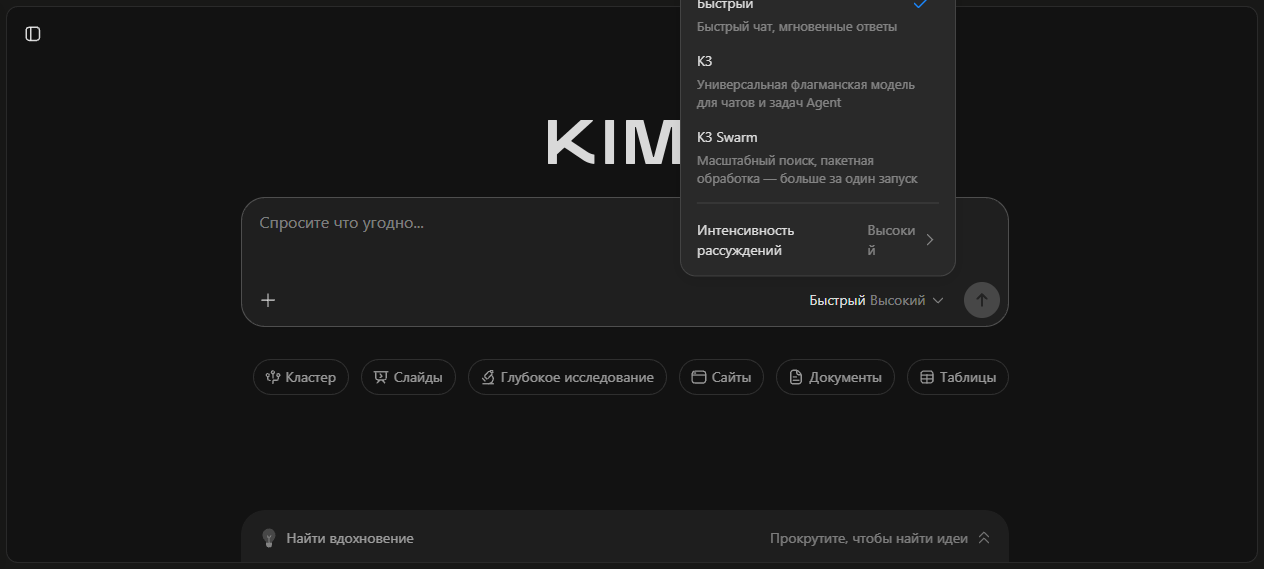
We checked for ourselves on July 18: kimi.com opens from Russia without a VPN, and the interface localizes immediately. A detail worth knowing: without an account the chat answers with the junior K2.6 by default — you pick the flagship K3 manually in the model selector above the send button.
By July 27 Moonshot had redrawn the selector: it now has three entries — "Fast", "K3", and "K3 Swarm" — plus a reasoning-intensity dial next to it (default: High). "Fast" is that same junior model that answers by default; K3 without login is still one click away. The screenshot above was taken on July 27, in fact.
There's a catch, though, that Habr (Russia's big tech hub) caught: after a few answers, K3 starts showing a busy-servers warning and nudges you toward a subscription. So calling K3 fully free isn't accurate — entry is free, sustained use is not.
The docs mention no direct geoblock for access from Russia. The site opens, the chat works. Problems only start at phone verification and payment.
First answer received — introductions made. Where you go next depends on the goal: casual questions are fine on the free plan, and if you want the model writing working code for you, see the Kimi Code section below. The skill itself — briefing an AI agent and driving the result to a finished app — isn't tied to Kimi, and it will outlive both K3 and K4.
Where to get Kimi: apps, Kimi Work, and Kimi Slides
The Kimi mobile app comes from the App Store (iOS), Google Play, and AppGallery (Android, HarmonyOS) — search for "Kimi", publisher Moonshot. The stores serve it to Russian users without regional restrictions; the account is the same as on the web.
For the computer there's Kimi Work — a desktop AI agent for Windows and Apple Silicon Macs: grab the installer from kimi.com; the agent works with files and programs right on your machine. K3 inside is available the same way as in the chat.
Kimi Slides is a presentation generator on the same model. No separate install: it lives in the browser, with the Slides tab visible right on the kimi.com home page.
July brought more neighboring tabs: Kimi Claw (a preview of an autonomous agent), Sheets, Docs, and Deep Research for long investigations. All of it lives in the same browser and account — nothing to install.
One fork to keep straight: "download Kimi" usually means the app or the desktop client, while "download the model" means open weights for your own server. Weights are covered in the section below — spoiler: you won't run them at home.
API and subscriptions: what it actually costs
Kimi K3 API pricing
Official Kimi K3 prices (platform.kimi.ai/pricing):
| Token type | Price per 1M |
|---|---|
| Input, cache hit | $0.30 |
| Input, cache miss | $3.00 |
| Output | $15.00 |
Caching is automatic: resend the same context prefix and you pay $0.30 for it instead of $3. No cache IDs to pass around. For comparison, Claude Opus 4.8 runs $5/$25 per million — so K3 is half the price on a typical coding task.
For orientation, competitor prices per 1M tokens (input/output): Kimi K3 — $3/$15, Claude Opus 4.8 — $5/$25, DeepSeek V4 Pro — cheaper still, with the exact figure depending on the provider. On price, K3 sits between "cheap China" and the expensive Western flagships.
But there's a flip side. K3 always has reasoning on and writes a lot of output tokens. As dev.to/tokenmixai notes, $15 per million output can eat the entire savings from the cheap input. If the model thinks out loud before every answer, the bill grows fast.
Budget by output tokens, not input price: with reasoning permanently on, output is what makes the final bill.
Subscriptions
Official plans (kimi.com/help/membership/membership-pricing):
| Plan | Monthly | Annual, per month | Agent credits | Kimi Code credits |
|---|---|---|---|---|
| Adagio (Free) | $0 | — | 6 | — |
| Moderato | $19 | $15 | 60 | 1× |
| Allegretto | $39 | $31 | 150 | 5× |
| Allegro | $99 | $79 | 360 | 15× |
| Vivace | $199 | $159 | 720 | 30× |
Key point: Kimi Membership and the Kimi API are separate billing systems. The subscription buys credits for the chat and Kimi Code; the API is paid per token on its own.
Two details from a fresh pricing check on July 27. First: beyond credits, Kimi Code has a separate five-hour weekly cap on agent runtime — you can hit it with credits to spare. Second: K2.6 in the chat is free on every plan and burns no credits, so for simple questions it's enough with no subscription at all.
A context gotcha. The Kimi Code docs say Moderato caps context at 256K, with the full 1M unlocking from Allegretto up. But the plan-selection page (kimi.com/help/membership/membership-pricing) lists 1M context only from Allegro at $99. A Habr news post pinned down the contradiction. Until Moonshot reconciles its docs, assume the guaranteed 1M is Allegro/Vivace, and Allegretto is your-mileage-may-vary.
What to pick: free Adagio is enough for chat, Moderato at $19 for a first taste of Kimi Code, and a guaranteed million of context today only comes with Allegro and up.
Paying from Russia
Our local reality check: Russian cards will most likely fail — the Help Center lists WeChat, Alipay, Apple ID, and Google Play as payment channels, with no direct support for Russian Visa/MC. The workable routes:
- A foreign card, if you have one.
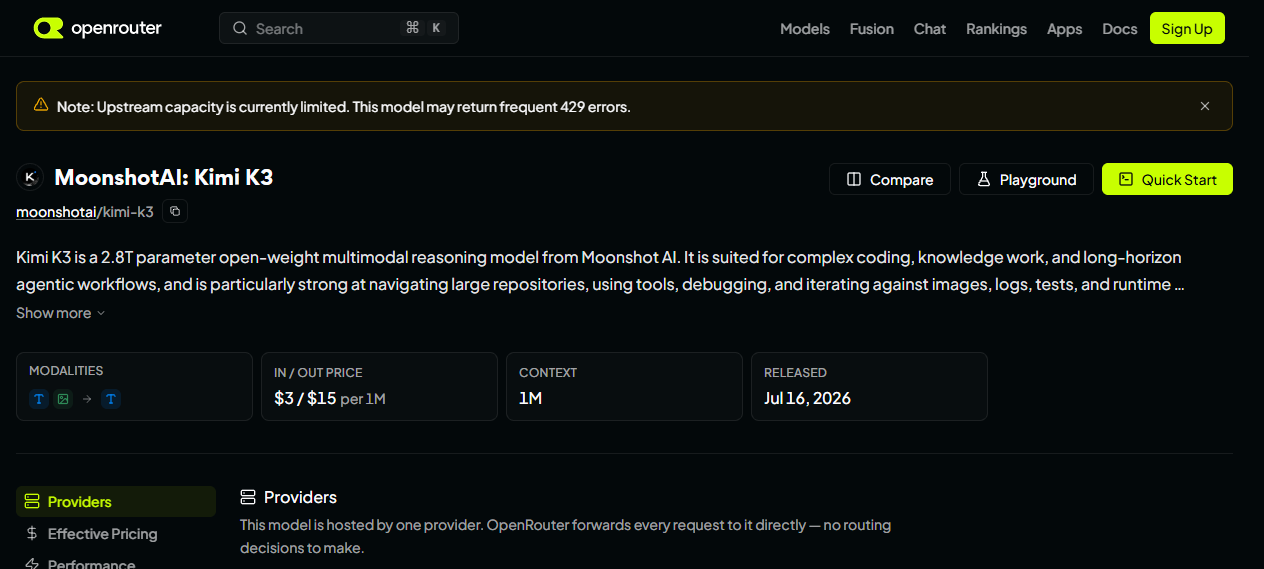
- OpenRouter. The
moonshotai/kimi-k3model is already listed at the same prices ($3/$15, cache read $0.30), with easier sign-up and more flexible payment. How OpenRouter works — in our OpenRouter guide. - Russian reseller platforms — a Russia-only option in one sentence: services like DS Lab (dslab.tech, ~$3.3/$16.7 per 1M — 300/1,500 RUB — with the full 1M context) and PlusVibe (plusvibeapi.ru, ~$0.90/$4 per 1M — 82/361 RUB — but context trimmed to 262K tokens) resell K3 for rubles, which means trusting a third party with your keys plus a markup and their limits.
And if you'd rather not deal with payments at all — for learning and first projects the free Groq API is enough: open models, a key in a minute, no card needed. We measured the free-tier limits on our own account — plenty for a study project.
The shortest working path without a foreign card is OpenRouter. Resellers make sense when you need ruble invoices and accounting paperwork and can live with the markup and someone else's limits.
Hooking up the API
Setup takes a couple of minutes: the API is OpenAI-SDK-compatible. A working example via OpenRouter — the route that's open from Russia without a foreign card:
from openai import OpenAI

client = OpenAI(
    base_url="https://openrouter.ai/api/v1",
    api_key="sk-or-...",  # ключ из настроек OpenRouter
)

resp = client.chat.completions.create(
    model="moonshotai/kimi-k3",
    messages=[{"role": "user", "content": "Чем Kimi K3 отличается от K2? Три пункта."}],
)
print(resp.choices[0].message.content)
The same code works with the official API: swap base_url for the address from the platform.kimi.ai docs and the model name for kimi-k3.
Kimi Code: vibe coding on K3
Kimi Code is a CLI agent for vibe coding, similar to Claude Code. Install it in your terminal, give it a task in plain text, and the agent writes, fixes, and runs the code itself. Switching to K3 inside the agent is the /model command. With a caveat: the rollout comes in waves — on our install of Kimi Code 0.20.1 (July 18, Allegretto subscription) the /model list still only shows kimi-for-coding; K3 hasn't arrived. If you see the same, update the CLI and check the list again in a couple of days. We re-checked on July 27: the CLI is still 0.20.1, with the same lone kimi-for-coding in the managed list — the K3 wave still hasn't reached us.
Kimi Code comes with subscriptions from Moderato up. The pricier the plan, the more agent credits. All features — chat, Kimi Code, other agents — draw from one shared pool.
A detail almost nobody highlights. The stock managed config of Kimi Code ships the kimi-for-coding model with max_context_size = 262144. To get the full 1M context in third-party coding agents, you have to set the window size manually — 1,048,576 tokens. Spotted in a vc.ru review (vc.ru/ai/3031150).
If you've installed Kimi Code, typed /model, and the agent ran its first command — you're already vibe coding. Whatever you save on subscriptions, invest in the skill. Models will rotate every month; knowing how to brief an agent and drive code to a product stays yours.
Kimi K3 or DeepSeek: which to pick
| Parameter | Kimi K3 | DeepSeek V4 Pro |
|---|---|---|
| Parameters | 2.8T | 1.6T |
| Context | up to 1M | depends on provider |
| API price | $3/$15 | cheaper, depends on provider |
| Open weights | yes, by July 27 | yes |
| Origin | China | China |
| Vibe coding | Kimi Code | third-party agents |
DeepSeek is cheaper and has more mileage. Its integration ecosystem is better and it has more independent evaluations behind it. Kimi K3 is fresher, bigger on parameters, and Moonshot takes the more aggressive stance on open weights.
For a free-chat test drive, either works. For coding on a subscription, the choice is between Kimi Code and the familiar agents like Claude Code, Cursor, or Windsurf. The newest model isn't automatically the best pick. Wait for the first independent evaluations — they usually take a couple of weeks after release — before moving production projects to K3.
More on DeepSeek in our review "DeepSeek: the coding model".
Open weights by July 27: can you run it yourself?
Moonshot promises to publish the full Kimi K3 weights by July 27, 2026. The license hasn't been named yet. The company's previous releases (K2.5, K2.6, K2.7-Code) shipped under a Modified MIT License with an attribution clause for big players (over 100M MAU or $20M monthly revenue). That's a precedent, not a guarantee for K3.
Status as of July 27: no K3 weights in the moonshotai profile on Hugging Face yet — the freshest thing there is K2.7-Code. The deadline runs out today, so the math is simple: either the release lands within hours, or Moonshot slips the date. Takes ten seconds to check — a new release floats to the top of the model list in the profile.
Can you run it yourself? The honest answer: no.
- 2.8 trillion parameters at standard precision is roughly 3 TB of VRAM.
- DTF's estimate puts it at 24 H100 GPUs.
- Moonshot's own blog talks about 64+ accelerators.
That's not a Mac Studio, and not even a home server. That's a rack in a data center.
So why do open weights matter to a regular person? They push prices down: providers compete with each other, and API costs fall. They grant independence from a single company: if Moonshot closes access, the model lives on with the providers. And they push the community to ship quantized versions — in a few months there may be lightweight variants you can actually spin up locally.
More on local models and Hugging Face in our article "Local LLMs: an overview".
FAQ
Is Kimi K3 free or not?
Entry is free: the chat at kimi.com and in the app runs on the Adagio plan with 6 agent credits. But after a few answers the system starts pitching a subscription. Calling K3 fully free would be a stretch. The junior K2.6, though, is genuinely free: it answers on any plan, Adagio included, and burns no credits.
What is Kimi's official website?
The main site is kimi.com. The K3 announcement blog is kimi.com/blog/kimi-k3. API docs are at platform.kimi.ai. Beware of fake mirrors and "sign-up through a middleman" offers.
How is K3 different from K2?
K3 is bigger (2.8T versus ~1T for K2.6), has the new KDA + AttnRes architecture and a claimed 1M context. K2 was a revolution on price and context; K3 is a bid to catch the top closed models while keeping the weights open.
Do you need a VPN for Kimi from Russia?
The docs mention no direct geoblock. The site opens without a VPN. Trouble may come at phone verification and payment — email sign-up, OpenRouter, or Russian reseller platforms cover those.
What is Kimi K3 Max?
Not a separate model. The Kimi chat UI shows Max/Swarm Max badges — those are modes of one and the same kimi-k3 model. There is no separate K3 Max model in the API.
When do the weights drop and where do you download them?
Moonshot promises to publish the Kimi K3 weights by July 27, 2026. They will most likely appear on Hugging Face in the moonshotai profile. Watch the official blog. As of midday July 27 the weights weren't there yet — the deadline runs out today.
How do you get Kimi on a phone or computer?
The Kimi mobile app is on the App Store, Google Play, and AppGallery — it downloads from Russia without a VPN. For the desktop there's Kimi Work (Windows and Apple Silicon Macs); the installer link is on kimi.com. Don't grab APKs from random sites: the official channels work.
Are "Кими" and Kimi K3 the same thing?
«Кими» is the Russian rendering of Kimi — the name of the chatbot and Moonshot's whole model line. Kimi K3 is a specific model inside that chat, the newest one. Without an account the chat answers with the junior K2.6; you pick K3 in the model selector — manually, one click. In the updated selector (late July) the junior mode is labeled "Fast", next to the K3 and K3 Swarm entries.
What replaces Kimi K3 if you need free and unlimited?
For chat — Kimi itself on the Adagio plan, or DeepSeek. For an API with no card — the free Groq tier: open models with generous limits for study projects. For full autonomy — local models on your own GPU: you can't host K3 at home, but 7–30B-parameter models run even offline.
Are kimi.ai, kimi-com.ru, and kimik2.com official sites?
No. Kimi's only official site is kimi.com, the developer platform is platform.kimi.ai, the open weights live at huggingface.co/moonshotai. Everything else is third-party mirrors and fakes: use them at your own risk, and never enter payment details.
Why won't Kimi registration work?
Since July 19, 2026 Moonshot has paused new-user sign-ups — the servers are overloaded after the K3 release, and slots open in batches. While you wait: the kimi.com chat works without login (K3 is selectable), the API is available via OpenRouter, and Groq is the free option for learning.
Where do you officially download Kimi Work?
Only from kimi.com, downloads section: builds for Windows and Apple Silicon Macs. Third-party "Kimi Work builds" from file dumps and shady sites risk delivering malware instead of an agent.
Keep reading
All articlesThis article is part of skillmake.ru — a Russian-language project about building real products with AI agents. The article you're reading is a translated case study from our production experience.
All articles More: tech & architecture